Appearance
Player annotations
Use these endpoints to group crops, skip tracks, assign accounts and set teams in your app. Recordings must belong to your partner account. JSON writes use Content-Type: application/json.
GET /partner/recordings/{video_id}/annotations
No request body. 200 OK:
Sample response
json
{
  "data": {
    "status": "ready",
    "reason": null,
    "revision": "rev_7",
    "crops": [
      { "track_id": "player-2", "crop_url": "https://assets.example.com/2.jpg", "is_reference": true },
      { "track_id": "player-8", "crop_url": "https://assets.example.com/8.jpg", "is_reference": true },
      { "track_id": "player-14", "crop_url": "https://assets.example.com/14.jpg", "is_reference": true },
      { "track_id": "player-21", "crop_url": "https://assets.example.com/21.jpg", "is_reference": true },
      { "track_id": "player-29", "crop_url": "https://assets.example.com/29.jpg", "is_reference": false, "suggested_ai_player_id": "player-2" },
      { "track_id": "player-31", "crop_url": "https://assets.example.com/31.jpg", "is_reference": false }
    ],
    "player_mapping": {},
    "skipped_track_ids": [],
    "assignments": {
      "player-8": { "clutch_user_id": "user_jamie_example", "partner_player_ids": ["player_2051"] }
    },
    "teams": {
      "pair-1": ["player-2", "player-8"],
      "pair-2": ["player-14", "player-21"]
    }
  }
}
Reference crop IDs are the ai_player_id slots. Use crop URLs directly. Suggestions are optional. Assignments return canonical Clutch IDs and linked IDs in your account; unoccupied slots are omitted. Unmapped, unskipped non-reference tracks are unreviewed.
Edit only when ready. Otherwise status is processing or unavailable, with null revision and empty collections. Unavailable reasons: no_ai, multiple_periods, no_players, crops_missing, processing_failed. This contract covers player annotation for a single singles/doubles match.
PATCH /partner/recordings/{video_id}/annotations
Request using either your player ID or the Clutch account ID:
json
{
  "revision": "rev_7",
  "player_mapping": { "player-29": "player-2" },
  "skipped_track_ids": ["player-31"],
  "assignments": {
    "player-2": { "partner_player_id": "player_1042" },
    "player-8": { "clutch_user_id": "user_jamie_example" }
  },
  "teams": {
    "pair-1": ["player-2", "player-14"],
    "pair-2": ["player-8", "player-21"]
  }
}
200 OK confirms the entire edit committed:
json
{ "data": { "revision": "rev_8" } }Send a revision and at least one annotation field. Use the returned revision for the next edit. GET returns saved state; omitted fields stay unchanged.
| Field | Save behavior |
|---|---|
player_mapping | Patch named non-reference tracks to reference slots. Null clears a track's grouping. Reference crops map to themselves automatically. |
skipped_track_ids | Replace skipped non-reference tracks. [] clears the list. Skipped tracks cannot also be mapped. |
assignments | Patch named slots. Supply exactly one ID form per slot, or null to unassign it. |
teams | Replace both teams. Every reference slot appears once: one per team for singles, two for doubles. Member order within a team is ignored. |
Both ID forms require an active link and consent, including accounts replaced or removed. A user occupies one slot; clear or reassign their old slot in the same save when moving them. Grouping, skips and teams can be saved before linking. Account assignments require linking first.
Unassigning can remove a non-creator's recording membership, post and invite acceptance. Creators keep membership with slot/stats cleared. Account links remain intact.
Saves are atomic. Retry timeouts/5xx with the same body:
- Same analysis run and requested values already saved:
200with the current revision, without repeated writes or side effects. - Values differ and revision is current: save the edit.
- Conflicting edit or reprocessing:
409 revision_conflict; reload and review.
An unrelated edit may change the returned revision. Refetch when reopening the editor.
Errors use {"error":{"code":"revision_conflict","message":"Reload annotations."}}.
| Error | Action |
|---|---|
400 invalid_request | Correct the body and resend. Common causes: a reference crop mapped, cleared or skipped; a track both mapped and skipped; one user on two slots; an unknown ID; or teams not listing every reference slot once. |
409 link_required | Connect or renew annotation consent for the affected player. |
409 revision_conflict | Reload crops/state and have the user review the edit again. |
409 annotation_unavailable | Reload readiness; save when ready. |
Standard authentication, ownership, not-found and rate-limit errors also apply. Recordings and account links are scoped to your partner account.
How slots work
A reference crop's track_id is the slot, so images never move between slots. You cannot map, clear or skip a reference crop. To link a player to a picture, find the reference crop that shows them and assign them to its track_id. Then map their other non-reference crops to the same ID.
Link a player to the player-14 picture and group another crop of them:
json
{
  "revision": "rev_7",
  "player_mapping": { "player-29": "player-14" },
  "assignments": { "player-14": { "partner_player_id": "player_1042" } }
}
Move that player to the player-2 picture. Clear the old slot in the same save, because a user can hold only one slot:
json
{
  "revision": "rev_8",
  "player_mapping": { "player-29": "player-2" },
  "assignments": {
    "player-14": null,
    "player-2": { "partner_player_id": "player_1042" }
  }
}
Undo a grouping by clearing the non-reference track:
json
{ "revision": "rev_9", "player_mapping": { "player-29": null } }Map a track you skipped earlier by removing it from skipped_track_ids in the same save. That field replaces the whole list:
json
{
  "revision": "rev_10",
  "skipped_track_ids": [],
  "player_mapping": { "player-31": "player-2" }
}
This body returns 400 invalid_request, because player-14 is a reference crop:
json
{ "revision": "rev_7", "player_mapping": { "player-14": "player-2" } }Clutch-hosted tagging (omit purpose)
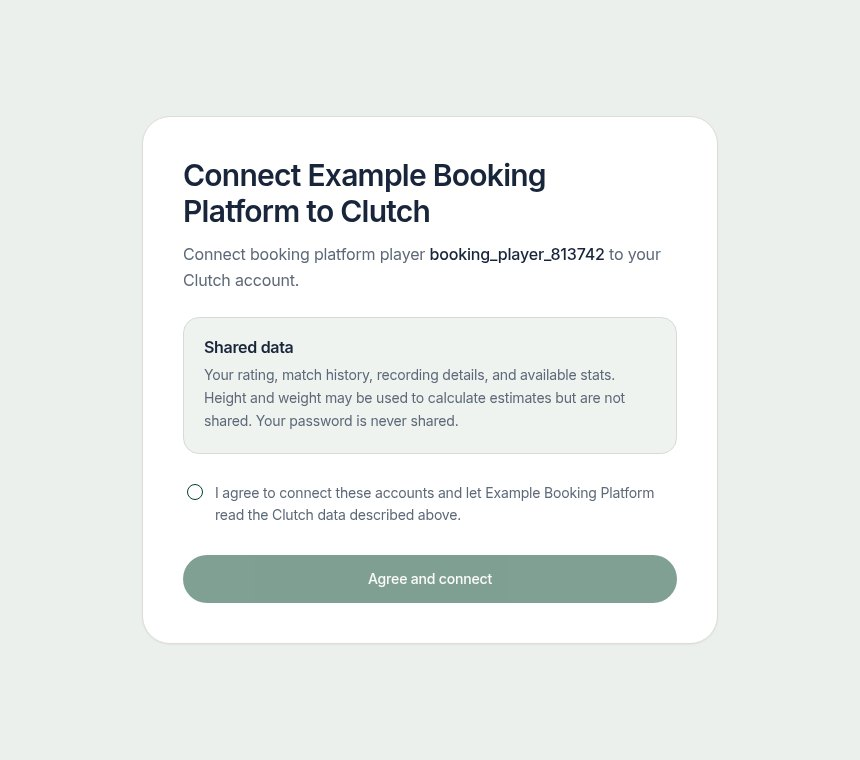
Use partner_player_id to identify a player from your system, such as their booking platform user ID. After the player signs in and gives consent, Clutch links that ID to their Clutch account.
POST /partner/player-links
Omitting purpose keeps the existing Clutch-hosted flow. It creates a hosted link. For a player who has not linked yet it is a connect link: the player signs in or registers, gives consent, and joins the recording when video_id is given. For a player who is already linked, with a video_id, it is a tag link: it opens that recording so the player can tag themselves, with no consent step.
Body:
json
{
  "partner_player_id": "partner_player_813742",
  "video_id": "B92BFC8A-2454-4632-9580-F96E99FB7C85",
  "return_url": "partnerapp://clutch/done"
}
partner_player_id is required. video_id is optional and must belong to the Partner. return_url is optional and must exactly match a URL registered for your account; ask Clutch to register them. https URLs and custom app schemes are accepted.
Sample response
json
{
  "data": {
    "partner_player_id": "partner_player_813742",
    "status": "pending",
    "link_url": "https://dashboard.clutchapp.io/partner/connect#token=HsE-la9Lcf9olvzt8E4KNlbhITBQ0S8dnqcxuMR1bnE",
    "expires_at": "2026-08-02T16:00:00Z"
  }
}
Connect links expire after 24 hours and work once. A new connect link replaces the player's earlier unused connect links, whichever recording they were for. Tag links expire after 7 days, can be opened again, and only work for the linked Clutch account. Tag links for different recordings can be open at the same time; a new tag link for the same player and recording replaces the previous one. Several Partner player IDs may map to the same Clutch account.
When video_id is provided, the player is added to the recording and lands on its Clutch match page. Once processing has finished, they first identify the players there, matching the AI's player crops to each other, and then tag themselves. The page opens on the identification step until someone has completed it.
When return_url is provided, the hosted flow sends the player back to it with status, video_id, and partner_player_id as query parameters. status is linked after consent on a link without a recording, or tagged once the player has tagged themselves. A player may also close the page instead; the webhook and GET /partner/recordings/{video_id}/players report the result either way, so treat status as a hint.
An already linked player without video_id returns status: linked, link_url: null and linked_at, the time they consented. A return_url that is not registered for your account returns HTTP 400 with return_url_not_allowed.